
Alma Fault Codes
Some Alma fault codes are easy to fix, others require specialist assistance.
If your Alma laser device displays a fault code, it usually indicates that one or more components require attention. These system faults can range from handpiece recognition issues to cooling system warnings.
We specialise in diagnosing and repairing Alma laser faults efficiently, helping clinics minimise downtime and get devices back to full functionality. Below is a breakdown of common Alma fault codes, what they mean, and how each issue can be fixed.
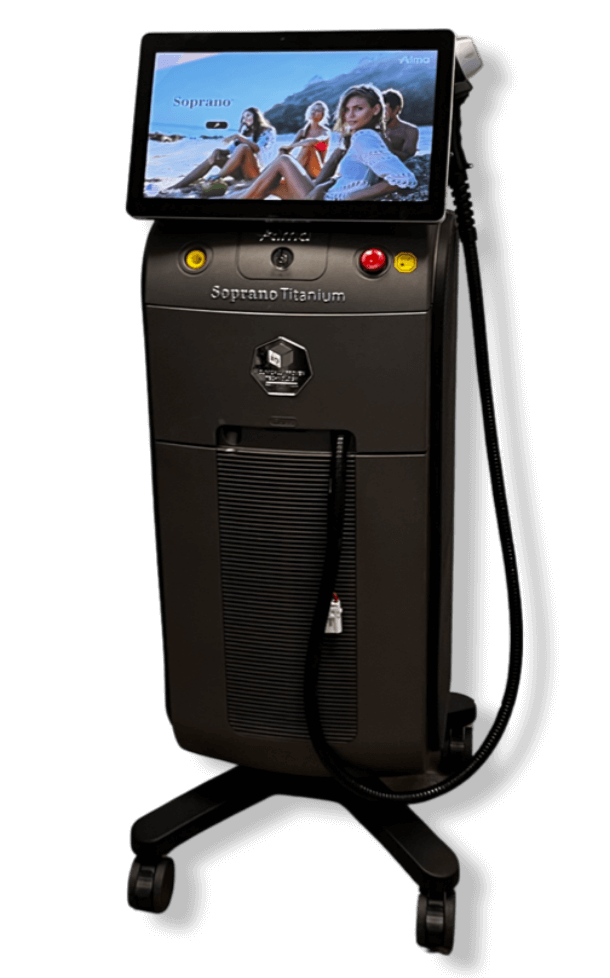
Alma Fault Codes
Fault Code |
System Fault |
| iButton INC Failed / Head Error iButton Failed | The device is unable to read the iButton chip in the handpiece. This can indicate a faulty iButton, poor connection, or corrupted chip. Replace the iButton or reconnect securely; in some cases, the handpiece may require refurbishment. If the issue continues, contact a GoLaser professional and we’ll be happy to help. |
| Handpiece RES Error | This error points to incorrect resistance readings from the handpiece, often because of damaged internal components or poor contact. Inspect and repair or replace the handpiece circuit board or contacts. If the issue persists, contact a member of our team. |
| RS232 CS Error / RS232 WD Error | These indicate communication difficulties between system components via the RS232 serial connection. Check and reinstall internal cables; replace communication boards if needed. If the issue continues, contact GoLaser for support. |
| Connect Interlock | The interlock safety system is not engaged. This may be caused by an open circuit or a disconnected footswitch/key. Ensure the interlock loop is properly connected and functioning. If necessary, replace malfunctioning interlock parts. If the problem continues, contact one of our friendly team members. |
| Flash Init Error | There is a Flash Data Error. On the Technician screen chose the "Fix Flash" and wait a few seconds, and press the "save" button. Then, shut the system down, wait a few seconds again, and turn the system on. If the problem continues, contact one of our friendly team members at GoLaser. |
| FlowSw Error / FlowSw OFF Error | Suggests a malfunctioning flow switch or insufficient water flow. Turn system off, wait one minute and restart. Make sure the coolant pump is operating, examine and clean the water flow sensor, and look for obstructions in the tubing. If the flow switch is defective, replace it. If the problem persists, contact one of our friendly team members. |
| Level Switch Error | A sensor or float switch problem is preventing the device from detecting the anticipated water level. Check the water tank level, clean the level sensor, and inspect the switch for faults. If your problem continues, contact the GoLaser support team. |
| LCD Does Not Match MCU | Android Apk version does not match. Update the software to make sure that it is a matching pair. If your problem continues, reach out to the GoLaser support team. |
| LevelSw Error | Turn the system off, wait 1 minute and restart it. Check the water level and then check the flow switch. If your problem is still occuring, contact the GoLaser support team. |
| Simmer Error | The laser's simmer circuit is not firing correctly, possibly due to an issue with the flashlamp or driver board. Inspect and replace the flashlamp or driver components if needed. Contact GoLaser for any support needed. |
| Pulse Data Out of Range | The laser parameter is too long. Shut it down and reach out to GoLaser for a service. |
| Head Error VB1=0 VB2=0 | Voltage readings on both VB1 and VB2 are zero, indicating a serious head or driver issue. Contact GoLaser to test the power supply and head connections; repair or replace the affected driver circuitry. |
| Driver Error Laser Off / Driver Error Over Curr | These error codes point to an issue with the diodes within the laser handpiece, typically caused by diode degradation over time due to extended use. The handpiece may require refurbishment, including replacement of the internal diodes. Contact the GoLaser support team for handpiece refurbishment and repair. |
| Driver Error Overtemp | The laser driver has exceeded safe operating temperatures. Check cooling fans, thermal sensors, and airflow within the unit. Any failed cooling components should be replaced. Contact GoLaser if your problem persists. |
| Driver Current Error | During lasing in OFFTIME, A/D value > OffDrv*2 or value < OffDrv < 2. Connect a new handpiece, then check the MEG 150. Contact GoLaser if your problem continues. |
| Driver Current Off Error | At START, STBY, and READY the A/D value > 100. Connect a new handpiece, then check the MEG 150. Contact our friendly team if your problem continues. |
| Save Data Error / Date Time Error | These issues are caused by corrupted internal clock settings or a failure to save system data. Reset date/time in system settings; inspect internal memory for faults. Replace the motherboard if necessary. Contact GoLaser for any support if your problem continues. |
| Unrecognized Applicator | The connected applicator does not belong to this system. Connect a new handpiece. Reach out to GoLaser for any support if the problem continues. |
| ThermalSw Error | The coolant temperature level is too high. Check water level. Then, wait for 15 minutes and restart the system, and if the system starts, then the problem is water temperature too high. So, check the room temperature and clean dust from the heat exchanger. Contact GoLaser for any support if the problem continues. |
| Freq Error | There is a laser signal frequency error. Restart the system and check again for any error, if the error persists, then install the last software on the interface controller and LCD and check again for any error. Contact GoLaser for any support if the problem continues. |
| No Pic Detected | No answer from pic tester. Check with another HP if you get the same error, if not, you need to go to the technical screen, disable PIC, restart the system, and see if the new error message appears. Contact GoLaser for the necessary support. |
| Pulse Power Out of Range | Check if the RED switch on the Interface controller is on PROG. If it's not, switch it and turn on the System. Contact GoLaser for any support needed. |
| No Pic Signal | Shut down and reach out to GoLaser for assistance. |
| Pulse Time Out of Range | Check if any wire from the 15 pin D (type of connector on the PIC controller) is loose, if it is, connect it back by Soldering. Reach out to GoLaser for any support needed. |
| PIC Version Error | PIC Software version error. Check match between the PIC versions to the controller, if a match is not found then reinstall the right match. Contact GoLaser for any support needed. |
| Machine Init Error | Machine failed to initiate Limit/Unlimit. Shut down and reach out to GoLaser for the necessary support. |
| Machine must assign to Clinic | Machine assignment to clinic failed. Enter the user name and password that you chose when registering to the smart clinic. Get in touch with a GoLaser professional for the necessary support. |
| Pulses Machine finished | Machine pulses finished. Need to buy a new package of pulses. Contact a GoLaser professional for the necessary support. |
| Machine iButton save Failed | Failure to save the current amount of pulses. Shut down and reach out to a GoLaser professional for the necessary support. |
| Unreality Temp | The thermistor reading is not a logical value. Check if the thermistor is connected and check the water temperature. Contact a GoLaser professional for the necessary support. |
Expert engineers with years of experience working with a wide range of laser devices.
High-quality parts and equipment to ensure that your Laser or IPL device is functioning optimally.
Comprehensive maintenance, repairs, and upgrades to keep your laser or IPL device running at peak performance.
Fast turnaround times and competitive pricing.
Personalised service tailored to your clinic’s specific needs and requirements.